Rent payment and supervision
Due date for rent payment is the 5th day of every month (or the following business day). At the beginning of your tenancy, you will receive a compilation invoice with the due dates for the rent payments until the end of February of the following year. Rents are reviewed annually, and new invoices are sent to tenants every year in November or December. Please contact our rent supervision if you have not received new invoices by the end of December.
Rents and security deposits must always be paid in EURO currency to the bank account of POAS. You can see the bank account details from the invoices we have provided. We never send new account details by SMS nor accept cash at our office. You have several options for paying rent: you can order an e-invoice directly to your Finnish online bank (see e-invoice instructions further below), pay as a traditional bank transfer according to the invoice we have provided, or you can pay rent directly in our tenant portal. You will be able to log in to the tenant portal from the first day of your rental agreement. Read more about our online services here.
How to pay without a Finnish bank account?
Security deposit is paid to POAS’ bank account before your tenancy begins. Receipt of the paid deposit has to be presented when picking up the keys. After your rental agreement has started, you can log into our tenant portal and pay rent with international credit cards.
Bank information for non-SEPA bank payments (cross-border bank transfers outside Single Euro Payments Area):
- Name of the bank: Nordea Bank ABP
- Bank address: Satamaradankatu 5, FI-00020 NORDEA, Finland
- BIC/ SWIFT code: NDEAFIHH
- Name of the bank account holder: Pirkan Opiskelija-asunnot Oy (or Kiinteistö Oy Kalevan Stara, if you live in Jäähallinkaari)
- Bank account number: see the IBAN bank account number from the invoices we have sent to you. Please note that there are separate bank accounts for deposit and rent payments.
- Reference number/message: see your reference number from the invoices we have sent to you. Please note that there are separate reference numbers for deposit and rent payments. If you cannot make payment as a reference payment, please add your reference number in the message field. With the reference number, your payment is automatically directed to your apartment’s rental agreement.
You can also use an international money transferring service that enables money transfers in EURO currency directly to Finnish bank accounts, such as Revolut.
Pay rent in the tenant portal
In the My economy section of our tenant portal, you can manage all matters related to paying rent: check your rent amount and open balance, see your previous payments, pay rent and other invoices sent by POAS (e.g. a new key, office fees, etc.). In addition to possible unpaid rents, tenant portal shows the upcoming rent payment which is due within the next 30 days. NOTE! Rent paid by other ways than in the tenant portal will appear to the tenant portal with a delay of 1-2 banking days.
- Login to the tenant portal in asukassivusto.poas.fi/
- You can change the language to English from the icon at the bottom right corner of the page.
- In the My Economy section, you can pay rents, see the previous payments you have made and possible other invoices sent by POAS.
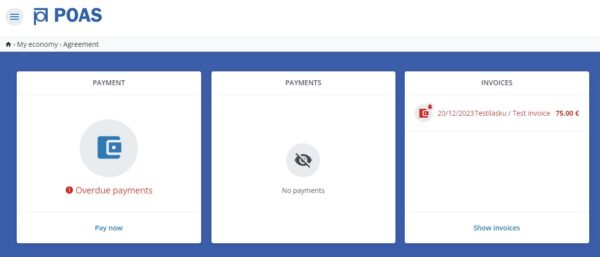
My Economy section in the tenant portal

Proceed to the payment service to pay your rent. Please note that an amount must be provided in order to proceed.
4. Go to the payment section and select Pay now. You have to insert an amount you wish to pay. Proceed to the payment service (Visma Pay), where you can pay using the most common debit and credit cards, MobilePay or Transfer payment apps, or Finnish online bank services.
5. Once the payment has been made, you will be redirected back to the tenant portal, where the payment you made will be updated in real time! Easy, isn’t it?
Housing allowance
If you are entitled to receiving Kela’s general housing allowance, it should be paid directly to POAS’s account. Please deliver the payment information you have received from POAS to Kela for the payment of your housing allowance. If Kela pays the allowance directly to POAS’s account, POAS does not send a separate invoice for the remaining amount. Tenant is responsible for following and taking care of rent payments, rent-related issues and informing Kela of possible payment changes.
E-invoice
POAS has enabled e-invoicing so, if you wish, you can activate an e-invoice and receive an electronic rent invoice directly to your online bank every month. You need to have Finnish online banking credentials in order to activate the e-invoicing.
How to order the e-invoice:
- Order the e-invoice in your own online bank. Navigate to the e-invoices section and subscribe to a new e-invoice. Search for a new e-invoice sender with the name of Pirkan Opiskelija-asunnot Oy or business-ID 0211539-7. (NOTE! NOT POAS or Pirkanmaan opiskelija-asunnot. If you live in Jäähallinkaari, search for the sender with the name Kiinteistö Oy Kalevan Stara or business-ID 3010478-3)
- When ordering an invoice, you must provide a reference number, which you can find from the invoices previously sent by POAS and/or tenant portal. Please make sure the reference number you provide is correct as you won’t receive any e-invoices if the reference number cannot be found.
- Ordering an e-invoice varies depending on the bank. If necessary, ask for additional instructions directly from your own service provider.
Recipients of Kela’s housing allowance! If Kela pays your housing allowance directly to the landlord’s bank account, the amount of allowance is not considered in the e-invoice, and therefore the full amount of rent is stated in the e-invoice. You need to deduct the amount of housing allowance from the invoice and change the amount yourself in your online bank.
Trouble paying rent?
If you have trouble with paying the rent, contact Intrum Oy immediately. If you don’t contact Intrum, and rents are not paid despite the reminder invoices they have sent, Intrum will begin debt collection proceedings. If you are in debt collection, your rent payment details are not available in tenant portal, and paying rent in the portal is not possible. If the rent moves to debt collection and you receive a reminder letter from Intrum, payments must be arranged as instructed in the letter.
Intrum contact details:
Mon–Thu 8:00 a.m.–6:00 p.m.
Fri 8:00 a.m.–5:00 p.m.
Tel: 09 2291 1798 (local/national rate)
Email: maksuvalvonta@intrum.com