Pay rent in our tenant portal
11.06.2024
Tenant portal has been updated. You can now pay your rent and possible other invoices directly from the tenant portal. In addition to possible unpaid rents, tenant portal shows the upcoming rent payment which is due within the next 30 days.
How to pay rent in the tenant portal:
- Login to the tenant portal here: asukassivusto.poas.fi/
- You can change the language to English from the icon at the bottom right corner of the page.
- In the My Economy section, you can pay rents, see the previous payments you have made and possible other invoices sent by POAS.
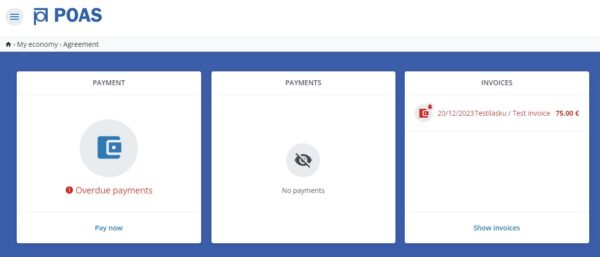
My Economy section in our tenant portal
4. Go to the payment section and select Pay now. You have to insert an amount you wish to pay. Proceed to the payment service (Visma Pay), where you can pay using the most common debit and credit cards, MobilePay or Transfer payment apps, or Finnish online bank services.

You need to insert an amount you wish to pay in order to proceed to the payment service. You can order a receipt of the payment to your email address.
5. Once the payment has been made, you will be redirected back to the tenant portal, where the payment you made will be updated in real time!
There are several options for paying rent
Please note that tenant portal is just one option to pay your rent. Tenant portal payment option is beneficial especially to those tenants, who don’t have Finnish online banking IDs. Alternatively, you can order an e-invoice directly to your Finnish online bank or pay as a traditional bank transfer according to the invoice we have provided. Rent paid by other ways than in the tenant portal will appear to the tenant portal with a delay of 1-2 banking days.
We remind you that paying rent every month is a lease agreement oblication, and banking problems is not reason to not to pay your rent. If you are in debt collection, your rent payment details are not available in tenant portal, and paying rent in the portal is not possible. More information of rent supervision.
If you need more information or need to discuss payment arrangements, contact rent supervision by sending a message in the tenant portal.